A Traveler’s Guide to eSIMs in Indonesia
Trips
Trips
23/09/2025

A Traveler’s Guide to eSIMs in Indonesia
Trips
Trips
23/09/2025
Planning a trip to Indonesia and wondering about staying connected? Whether you're island-hopping from Bali, exploring Jakarta's bustling streets, or trekking through Sumatra's rainforests, reliable internet access is essential for navigation, communication, and sharing those Instagram-worthy moments.
eSIM technology has revolutionized how travelers stay connected abroad. Instead of hunting for SIM cards at crowded airport kiosks or dealing with language barriers at local shops, you can now purchase and install a mobile plan digitally before you even board your flight.
This comprehensive guide covers everything you need to know about using eSIMs in Indonesia: what they are, how to check if your phone is compatible, what happens to your phone number, and step-by-step activation instructions. By the end, you'll be equipped to make an informed decision about whether an eSIM is right for your Indonesian adventure.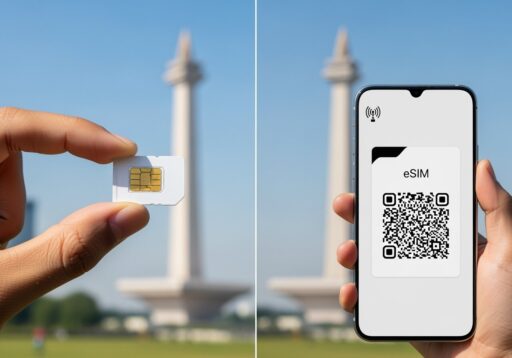
What is an eSIM and How Does it Work?
The Basics
An eSIM (embedded SIM) is a digital SIM card built directly into your smartphone's hardware. Unlike traditional plastic SIM cards that you physically insert into your phone, eSIMs are activated through software using a QR code or activation link. Here's how the process works:- Purchase an eSIM plan from a provider
- Receive a QR code via email or download link
- Scan the code with your phone's camera
- The carrier profile downloads and activates automatically
- Start using local data and services immediately
Why eSIMs Are Perfect for Travelers
Convenience: Install your Indonesian mobile plan before departure, eliminating airport queues and language barriers. Flexibility: Keep your home number active while using a local data plan, perfect for receiving important calls and messages. Security: No physical SIM card to lose or have stolen during your travels. Multi-country trips: Easily switch between different country plans without carrying multiple SIM cards.Understanding Phone Numbers and eSIMs: What Travelers Need to Know
Will You Get an Indonesian Phone Number?
This depends entirely on the type of eSIM plan you purchase: Full-Service Plans: Include an Indonesian phone number (+62) for calls, SMS, and data. Perfect if you need to:- Register for local services like Gojek or Grab
- Receive SMS verification codes from Indonesian businesses
- Make local calls to hotels, restaurants, or tour operators
- Primarily use messaging apps like WhatsApp or Telegram
- Don't need to receive SMS from local services
- Want the most affordable connectivity option
Managing Multiple Phone Numbers
Modern smartphones support dual-SIM functionality, allowing you to use your home SIM alongside an Indonesian eSIM. You can:- Set which number to use for calls and SMS
- Choose which plan handles mobile data
- Receive calls and messages on both numbers simultaneously
Device Compatibility: Is Your Phone eSIM-Ready?
Quick Compatibility Checklist
Before purchasing an eSIM, verify your device meets these requirements: ✓ eSIM-Capable Model- iPhone XS/XR and newer
- Google Pixel 3 and newer
- Samsung Galaxy S20 and newer (varies by region)
- Most flagship phones from 2019 onwards
- Phones purchased directly from carriers may be locked
- Contact your carrier to request unlocking before travel
- Factory unlocked phones typically support all eSIM providers
- iOS 12.1 or later for iPhones
- Android 9.0 or later (varies by manufacturer)
- Update your OS before traveling for best compatibility
- Most phones support 1 active eSIM + 1 physical SIM
- Some newer models support multiple eSIM profiles
- Check your phone's specifications for exact limits
How to Check eSIM Support
For iPhone users:- Go to Settings > General > About
- Look for "Available SIM" or "Digital SIM" entries
- If present, your iPhone supports eSIM
- Go to Settings > Network & Internet > Mobile Network
- Look for "Add carrier" or "Add mobile plan" options
- Consult your manufacturer's website for model-specific information
Step-by-Step eSIM Activation Guide
Before You Travel
- Purchase Your eSIM Plan
- Research providers offering Indonesian coverage
- Choose between data-only or full-service plans
- Consider your data needs and trip duration
- Prepare Required Documents
- Have your passport ready for verification
- Some providers require IMEI registration
- Save activation codes and provider contact information
Installation Process
- Connect to Wi-Fi
- Ensure stable internet connection during setup
- Airport or hotel Wi-Fi works fine for activation
- Add the eSIM Profile
- iPhone: Settings > Cellular > Add Cellular Plan
- Android: Settings > Network & Internet > Mobile Network > Add Carrier
- Scan the QR code or enter activation details manually
- Configure Settings
- Label your plans (e.g., "Home" and "Indonesia")
- Set data preferences and default lines for calls
- Test connectivity with a web search or speed test
- Verify Registration
- Some Indonesian providers require IMEI registration
- Follow any additional verification steps promptly
- Keep confirmation emails for reference
Choosing the Right Indonesian eSIM Provider
Major Network Options
Telkomsel- Largest coverage area, including remote islands
- Strong 4G/5G network in major cities
- Best choice for comprehensive Indonesia travel
- Competitive pricing for data plans
- Good urban coverage, limited in rural areas
- Popular among budget-conscious travelers
- Strong presence in Java and Bali
- Competitive speeds in covered areas
- Good option for focused regional travel
Plan Types to Consider
Tourist-Specific Plans: Designed for short-term visitors with generous data allowances and simplified activation. Prepaid Data Plans: Flexible options with various validity periods (7, 15, 30 days). Unlimited Plans: Higher cost but no data caps, ideal for heavy users or digital nomads.Common Issues and Troubleshooting
Activation Problems
eSIM Won't Install- Verify QR code hasn't expired
- Check internet connection stability
- Restart phone and try again
- Contact provider support if issues persist
- Confirm eSIM is set as active data line
- Check APN settings if provided by carrier
- Toggle airplane mode on/off to refresh connection
SMS and Calling Issues
Can't Receive SMS Verification Codes- Ensure you have a full-service plan (not data-only)
- Check if SMS is included in your plan
- Use alternative verification methods when possible
- Understand rates for calling home
- Consider using VoIP apps like WhatsApp or Skype
- Check if your plan includes international minutes
Managing Multiple SIMs
Battery Drain- Dual-SIM operation can increase battery usage
- Disable unnecessary background app refresh
- Consider carrying a portable charger
- Clearly label your SIM profiles
- Set default preferences for calls and data
- Review settings before making important calls
Practical Tips for Travelers
Before Departure
- Test at Home: Install and test your eSIM while still in your home country
- Backup Plans: Keep provider contact information and activation codes accessible
- Document Everything: Screenshot important settings and confirmation emails
During Your Trip
- Monitor Usage: Check data consumption regularly to avoid overage charges
- Local Apps: Download Indonesian apps like Gojek, Grab, and local maps
- Emergency Contacts: Save important local numbers in your phone
Money-Saving Strategies
- Wi-Fi First: Use hotel and restaurant Wi-Fi when available
- Offline Maps: Download Google Maps offline for your destinations
- Messaging Apps: Use WhatsApp, Telegram, or Signal instead of SMS
Pros and Cons: Is an eSIM Right for You?
Advantages
✓ Instant Connectivity: No airport queues or language barriers ✓ Dual-SIM Convenience: Keep home number active while using local data ✓ No Physical Card: Nothing to lose or damage during travel ✓ Easy Switching: Change plans or providers without visiting stores ✓ Pre-Trip Setup: Install and test before departureDisadvantages
✗ Device Limitations: Not all phones support eSIM technology ✗ Carrier Restrictions: Some locked phones won't accept foreign eSIMs ✗ Technical Issues: Troubleshooting can be more complex than physical SIMs ✗ Limited Sharing: Can't easily share connection with travel companions ✗ Provider Dependence: Rely on digital delivery and customer supportHow to Stay Connected in Indonesia
eSIM technology offers Indonesian travelers unprecedented convenience and flexibility for staying connected. Whether you're a digital nomad working from Canggu's cafes, a family exploring Jakarta's attractions, or an adventurer trekking through remote islands, the right eSIM plan can keep you connected without the hassle of physical SIM cards. The key to success lies in preparation: verify your device compatibility, choose the right plan for your needs, and install your eSIM before departure. With proper planning, you'll land in Indonesia with immediate connectivity, ready to navigate, communicate, and share your incredible journey. Remember that technology is just one part of travel preparation. While staying connected is important, don't forget to occasionally disconnect and fully immerse yourself in Indonesia's rich culture, stunning landscapes, and warm hospitality.Receive news directly in your inbox
Become part of the club and get good advice directly in your inbox - completely free.
Your email address
Register now
You are now registered - thank you
By continuing, I accept the terms of use and data protection.
By signing up for the newsletter, you accept our terms and privacy policy. You can always unsubscribe again.